Building a Production-Ready Notification System That Actually Scales

Fullstack Engineer in a committed relationship with Typescript. Obsessed with performance and building large-scale applications.
So you've built an app that sends notifications to users. Congrats! But now your users are growing, your push notification volume is skyrocketing, and suddenly things are breaking down. Push requests are timing out. Messages are getting lost. Your database is screaming for help.
If this sounds familiar, you're not alone. Building a notifications system that can handle production traffic is way harder than it looks. In this post, I'm going to walk you through exactly how I built a notification service that can handle real-world load while staying reliable.
Let me start by showing you what we're dealing with here.
The Challenge
You might be thinking: "How hard can sending notifications be?" Well, buckle up. Here's what you actually need to handle:
You need to send thousands of notifications simultaneously without overwhelming the Push Notifications API. You need to retry failed messages intelligently so they eventually deliver. You need to track what fails and why. You need to monitor everything so you catch issues before your users do.
And you need to do all of this while keeping your database load reasonable. That last one is super important because your primary database is probably doing a lot of other work too.
So yeah. It's not just a "send notification and hope it gets delivered."
The Architecture
Here's the system I built. It has several key pieces working together:
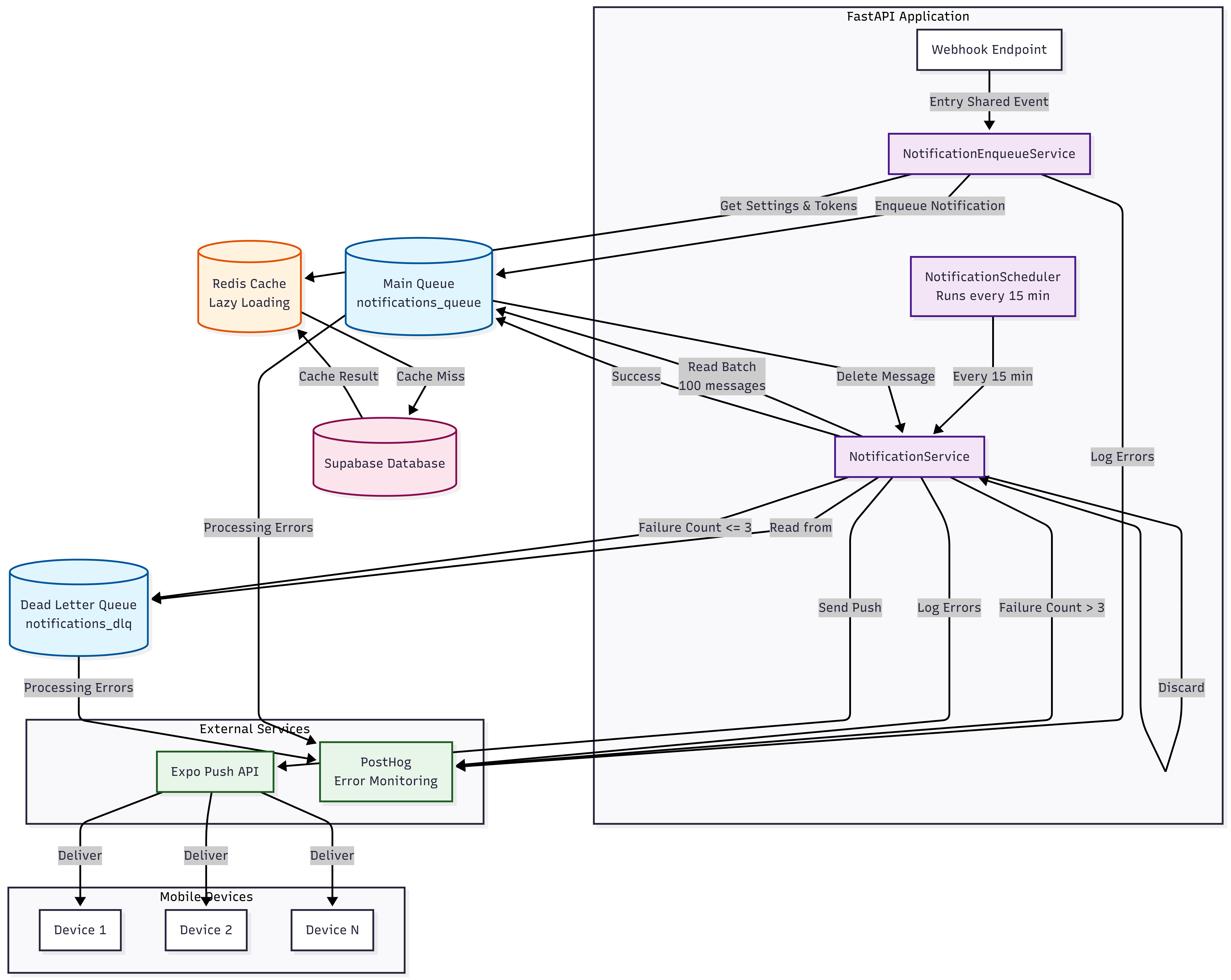
FastAPI Application: Webhooks and triggers hit this. It enqueues notifications but doesn't wait for them to actually send.
NotificationEnqueueService: Figures out who needs to receive the notification based on sharing settings, grabs their push tokens, and gets everything ready.
CacheService: A two-tier cache using Redis for speed and Supabase as a fallback. This is crucial for performance.
NotificationService: The workhorse. It processes messages from the queue, handles retries, talks to Expo, and moves failures to a dead letter queue.
Supabase Queue (pgmq): Message queue that persists notifications until they're sent. The setup had 2 queues, an initial queue for persisting notifications and a dead-letter queue for persisting failed notifications.
NotificationScheduler: Runs every 15 minutes to process pending notifications in batches.
Expo Push Notification API: Actually delivers the notifications to user devices.
The key insight here is that sending notifications is async. Your API returns immediately. Then the scheduler processes them in the background. This keeps your endpoints fast and prevents your database from getting hammered.
Where Performance Matters
Let's talk about the parts of this system that actually affect how well it scales.
Caching Strategy
Notification settings and push tokens get requested a lot. If you hit the database for every single user every single time you need their settings, your database is toast.
So I implemented a lazy-loading cache using Redis:
Check Redis first (super fast)
On cache miss, fetch from Supabase (slower but still reasonable)
Cache the result for an hour
If Redis is down, just use Supabase directly
The key thing is: never fail if Redis is unavailable. Your notifications are too important. Always have a fallback.
This approach reduced database queries by about 80 percent for frequently accessed data. That's a massive difference when you're handling high volume.
Batch Operations
Fetching notification settings one user at a time would be incredibly slow. Instead, I use Redis MGET to fetch multiple items in one call. Then any items that aren't cached get fetched from Supabase in a single batch query.
So instead of 1000 database calls, you might make 5 or 10. The difference is night and day.
Concurrency Control
The Expo API has rate limits. If you hammer it with too many concurrent requests, it will reject you. But you also don't want to send notifications one at a time because that's painfully slow.
So I use asyncio.Semaphore in Pyhon to limit concurrent sends. By default it's set to 20 concurrent requests, and can easily be scaled up or down based on your Expo rate limits. This keeps the Expo API happy while still moving through the queue quickly.
When you hit a rate limit, the system backs off exponentially. First retry after 2 seconds, then 4, then 8, and so on. This gives the API time to breathe without losing messages.
Handling Failures Gracefully
Here's the thing about production systems: things fail. Your job is to make sure failures don't cascade and destroy everything.
Dead Letter Queue
If a notification fails to send after retries, it moves to a dead letter queue for manual review. But I don't keep failures around forever. After 3 failures, the message is logged and discarded.
Why log it and not just ignore it? Because you need visibility into what's breaking. I use PostHog to capture these errors with full context. Then you can actually investigate and fix issues instead of wondering why notifications are missing.
Exponential Backoff
When a message fails, you don't want to immediately retry. And you definitely don't want to retry at the same time as everything else that failed. Exponential backoff with some randomness spreads out retry attempts so you don't create a thundering herd that brings the whole system down.
The Real World Problems I Ran Into
Building this thing in production meant running into some annoying edge cases.
Environment Variable Shenanigans
I had my REDISDB environment variable set to a string instead of a number. This caused a ValueError when the code tried to convert it to an integer. Dumb mistake, but it happens. The fix was simple: create a helper function that safely parses integer environment variables and gracefully falls back to defaults.
This made me realize something important. Your configuration parsing needs to be bulletproof. If it crashes, your entire service is down before it even starts.
Breaking Changes in Dependencies
The Expo SDK updated to version 2.2.0 and changed exception names from PushResponseError to PushServerError. Plus the constructor signature changed. This broke all my error handling.
The lesson here is tedious but important: vendor dependencies carefully. Test your error handling paths. Keep an eye on changelog updates, especially for critical dependencies.
Redis Availability
Redis going down shouldn't cause the whole system to fail. But I had to explicitly handle this in the cache layer. If Redis doesn't respond, don't crash. Just use Supabase. Yes, it's slower. But slow is better than broken.
Testing All This Complexity
With this many moving parts, you absolutely need comprehensive tests. I wrote 50 tests covering unit, integration, and scheduler scenarios.
The tricky part was mocking all the dependencies correctly. Supabase, Redis, and Expo all needed to be mocked in a way that actually tests the logic. I used pytest fixtures for each service and monkeypatching for dependency injection.
One thing I learned: test the happy path, but spend even more time on error cases. The happy path usually works. It's the errors that bite you in production.
Performance Gains That Actually Matter
Let's get concrete about what this architecture actually does for you:
Caching: 80 percent reduction in database queries for notification settings and push tokens.
Batch Operations: Instead of 1000 individual database calls, you make maybe 10. That's a massive difference.
Concurrency Control: You can process notifications at high volume without overwhelming the Expo API.
Queue Processing: Handles 100 messages per scheduler run. You can increase this if needed.
Lazy Loading: Only caches data when it's actually used, so memory usage stays reasonable.
Put these together and you've got a system that can actually scale.
Key Takeaways
If you're building a notifications system, here's what matters:
Always have fallbacks. Redis is great, but Supabase fallback is what keeps you alive when things break.
Test thoroughly. 50 tests might sound like a lot, but for critical infrastructure it's the minimum.
Handle errors gracefully. Never let a single failure break the whole system. Log it, track it, but keep moving.
Monitor everything. PostHog integration gives you visibility into what's actually happening. You can't fix what you can't see.
Design for scale from the start. Concurrency control and batch processing aren't optional if you plan to grow.
Wrapping Up
Building a notification system that handles real production load is hard. You need reliability, performance, and observability all at the same time. But when you get it right, you've got something that scales, fails gracefully, and gives you the visibility to fix issues before they become disasters.
The system I built here uses Python, FastAPI, Supabase, Redis, Expo Server SDK, PostHog, and the APScheduler in Fast API. All of these are solid production-ready tools. The real trick is putting them together in a way that doesn't fall over when things get busy.
If you're tackling this problem, I hope this gives you some ideas for how to approach it. Notifications might seem simple on the surface, but getting them right in production is where the real engineering happens.


